
Life Gauge Calculation and Timing Windows in beatmania IIDX
Table of contents
Gauge types
For a simple, high-level explanation of each gauge types, please see this page.
Notes
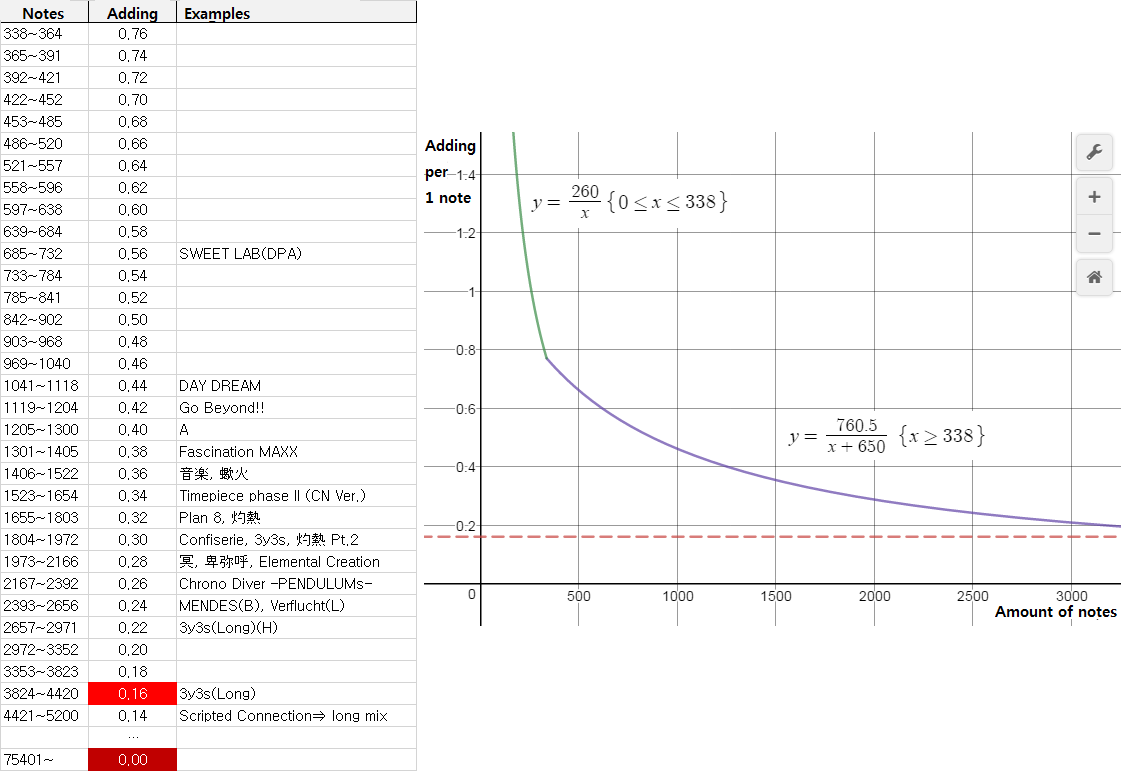
- a = a function of total note count in IIDX – see below
- all units in %
- For EASY and NORMAL, you start at 22%, and need 80% in the end of a song to clear. For ASSIST EASY, you start at 22% but need 60% to clear.
- HARD, EXHARD, DAN, and EX-DAN gauges are “survival” gauges - you start at 100%, and get a stage fail if you drop to 0%.
- 空P is excessive poor.
| PG | GREAT | GOOD | BAD | POOR | 空P | Low Life Adj† | |
|---|---|---|---|---|---|---|---|
| A.EASY | a | a | a/2 | -1.6 | -4.8 | -1.6 | - |
| EASY | a | a | a/2 | -1.6 | -4.8 | -1.6 | - |
| NORMAL | a | a | a/2 | -2 | -6 | -2 | - |
| HARD | 0.16 | 0.16 | 0 | -5 | -9 | -5 | Yes |
| EXHARD | 0.16 | 0.16 | 0 | -10 | -18 | -10 | No |
| DAN | 0.16 | 0.16 | 0.04 | -1.5 | -2.5 | -1.5 | Yes |
| EX-DAN | 0.16 | 0.16 | 0.04 | -3.0 | -5.0 | -3.0 | No |
† Low Life Adjustment: when the gauge is at or below 30%, the rate of decrease caused by BAD and POORs are halved. For example, when playing on HARD gauge, if you are at 28% life and get a POOR, you lose 4.5% instead of 9%.
IIDX a-value explained
Timing window
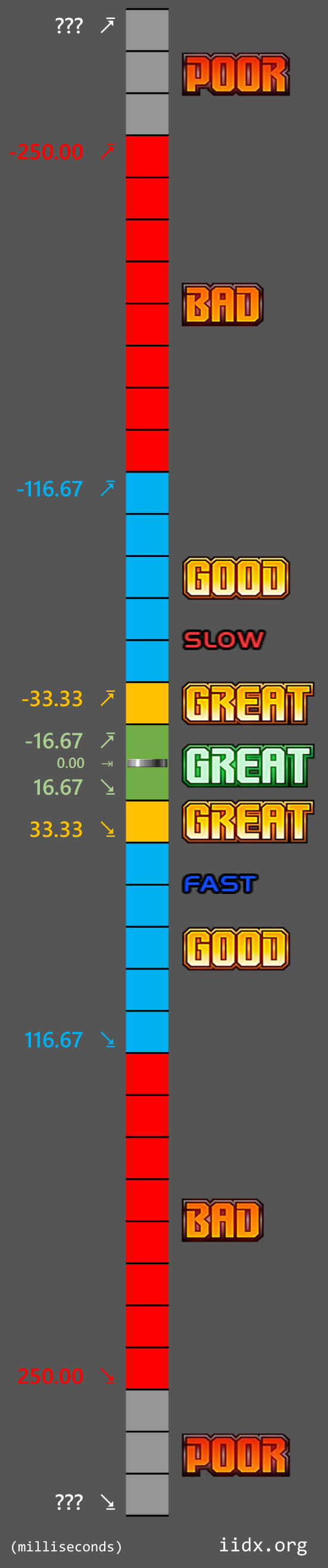
Note: this is to illustrate an idealized and abstracted view of the timing window in IIDX. In reality:
- The game engine is based on ticks via quantization.
- Due to above, the 0-point spans a tick, which means the note isn’t sitting exactly at 0.0ms point.
- The I/O engine performs averaging of recent input for debouncing.
- When calculating timing, the game engine may insert a fixed offset, depending on the version.
- When the note is drawn on the screen isn’t the true 0.0ms; additinoally, it is affected by user’s offset and display input lag.
… and so on. This page is not meant to be an in-depth reverse engineering of the game engine, so please don’t ask for that.
| JUDGE | Window (ms) | Resets combo |
|---|---|---|
| PGREAT | ±16.67 | No |
| GREAT | ±33.33 | No |
| GOOD | ±116.67 | No |
| BAD | ±250 | Yes |
| POOR | at -250 | Yes |
| 空POOR | ? | No |
All units in milliseconds. Positive means before the note, negative is after the note.
Pressing a button within the BAD window counts as judgement for that note, and “erases” the note from view.
Regular POOR happens if you don’t press a button within the late BAD window. This resets the combo.
FAST 空POOR happens if you press a button slightly before the FAST BAD window. This does not erase the note.
SLOW 空POOR happens if you press a button again slightly after pressing it to count toward the judgment of a note (the first press will be a BAD or greater, and the second press will be a POOR). If the button press happens to be within the next note’s BAD window, that it will count towards that instead.
For Charge Notes (and Back Spin Scratch):
- if you get BAD or POOR on the start of a CN, there is no judgement for at the end of a CN (no impact on life gauge, does not in crease any numbers in JUDGE window)
- the “release” judgement window at the end of a CN only has PGREAT; GREAT and GOODs get automatically upgraded to PGREAT.
It is possible for some charts to have more restrictive timing windows; the most notable one is GAMBOL.
For DP, timing windows are identical for notes, but GREAT window is slightly wider for scratches.
It is a myth that the timing windows are asymmetric; the timing windows themselves are the same duration before and after the precise timing. It is not larger on one side.
Further reading
IIDX LR2 beatoraja differences
https://zenius-i-vanisher.com/v5.2/viewthread.php?threadid=5233